For private clinics and chains
Your clinic under control, in one system
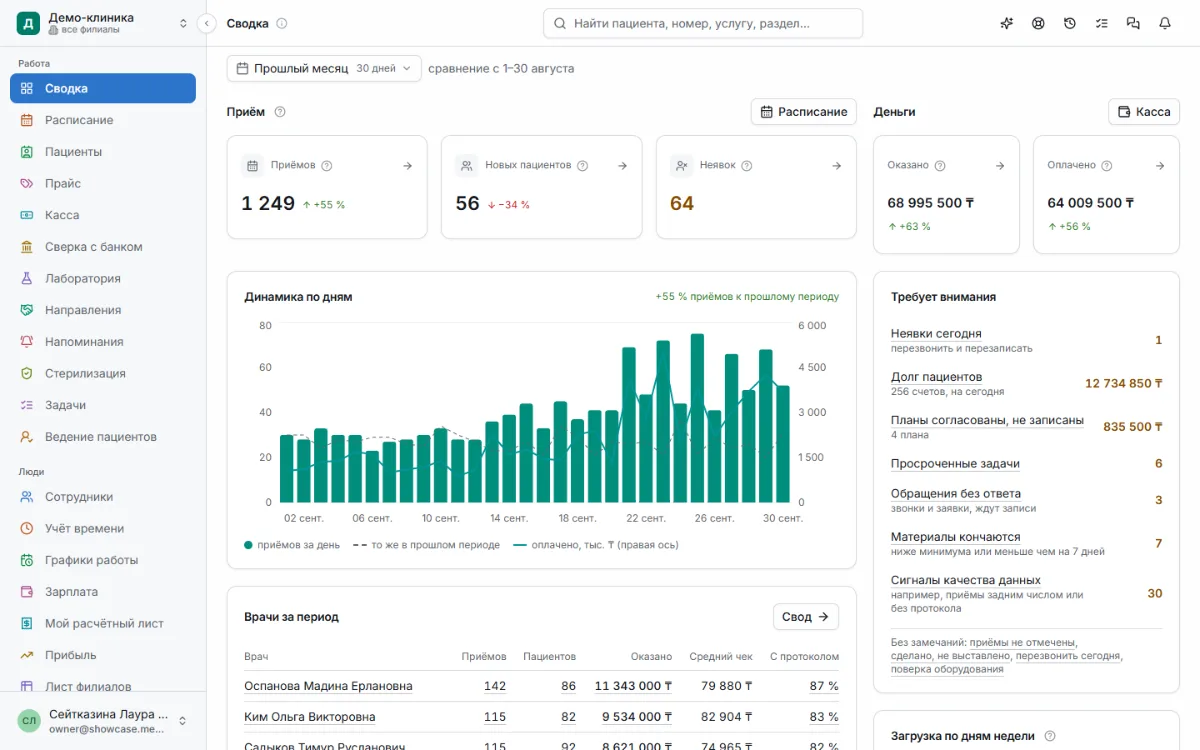
Schedule, patients, cash desk, stock and payroll — even with branches in different countries. The owner sees the whole clinic and keeps money under control, while receptionists and doctors work without extra screens.
- Computer, tablet and phone
- Access set per employee
- Move from another system or spreadsheets
Taxes by country
Kazakhstan built in, others as modules
Data under protection
Hosted in locations that meet legal requirements
Access per person
Everyone sees only what their job needs
Everything on record
Who changed what, and when — visible to the owner
What you get
Not a list of modules, but answers to a clinic owner’s questions.
The whole clinic on one screen
Visits, money and no‑shows for any period. Any number opens into the list it came from. Branches are compared against plan in a single table.
Big money moves only with your approval
Discounts, refunds and cash‑desk expenses that go beyond the usual never pass silently: the owner decides with one tap.
The unusual shows up right away
Radar gathers odd actions with money, access rights and the patient base into one feed. The owner learns about the most important ones the same day, not at an audit.
Fewer empty chairs
No‑shows, a waiting list and patient reminders: freed‑up time is not lost, and patients remember their appointments.
Patients are guided to the result
Every patient has someone responsible and a next step. Treatment does not get lost after the visit, and each visit follows the clinic’s standard.
Payroll without disputes
Payroll follows the rules of the legal entity’s country — Kazakhstan taxes are built in, the payslip is clear to the employee (if the clinic enables it), and a closed month cannot be changed retroactively.
Control and security
The clinic trusts its staff, and still sees what is going on.
Everyone sees their own
Access is granted per person: a doctor sees their own patients, but not the clinic’s revenue.
Nothing leaves no trace
Activity history: who, when, what it was and what it became, from which device.
Money needs the owner’s approval
Big discounts, refunds and expenses wait for the owner’s answer. The employee can see the request has been sent.
Owner’s radar
Unusual actions with money, access rights and the database land in a feed that only the owner can see.
Sign‑in on your terms
Password, emailed code, QR from a phone or a passkey: the clinic chooses which methods are allowed and who needs a second step.
Data under protection
Passwords are never stored in plain text and connection keys are encrypted. Exporting lists to a file is a separate permission. Data is hosted in locations that meet the legal requirements of the countries involved.
Phone and tablet
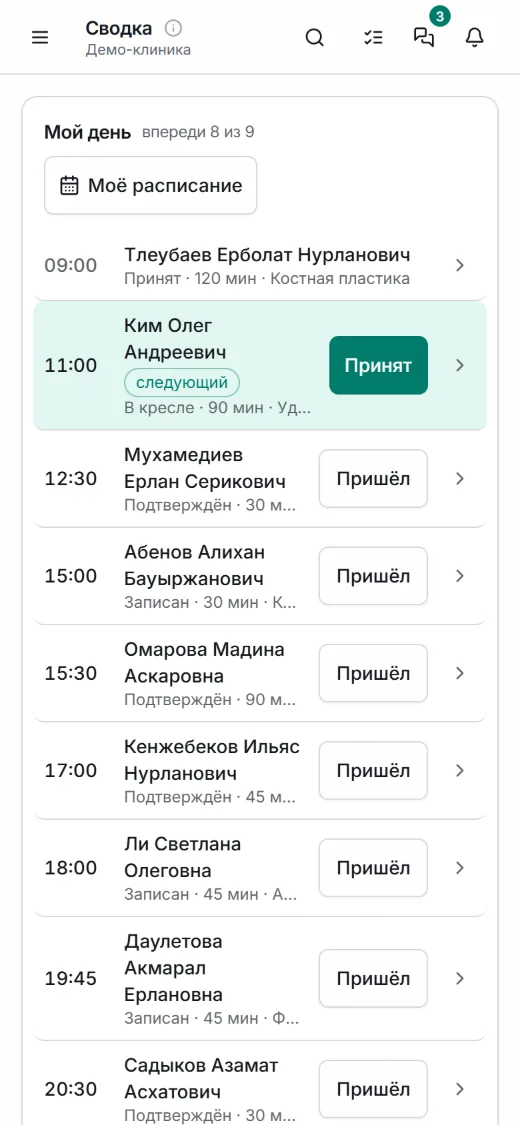
The phone has the same sections as the computer. An icon on the home screen, notifications about shifts, tasks and messages, and check‑in from the phone.
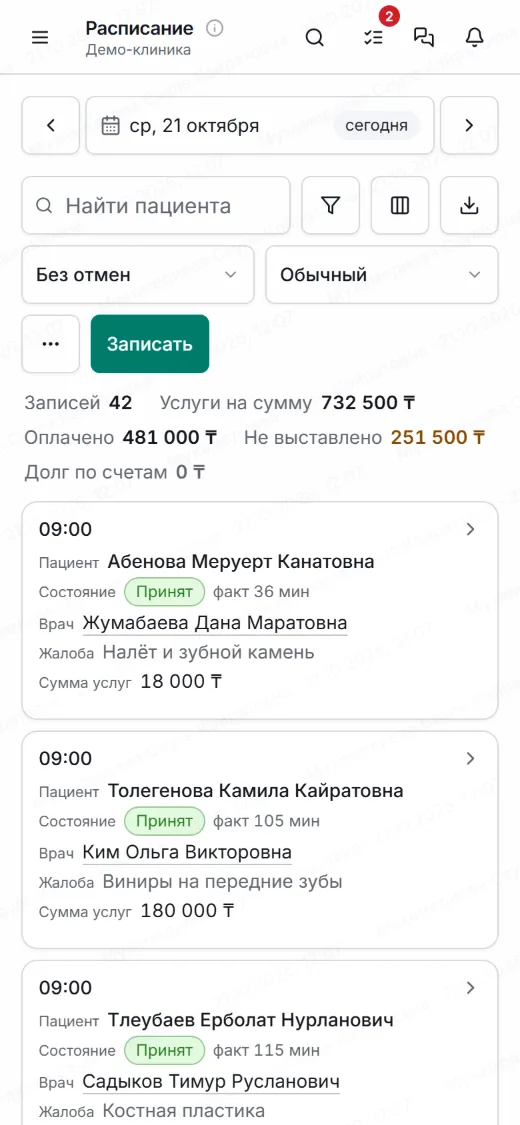
Schedule 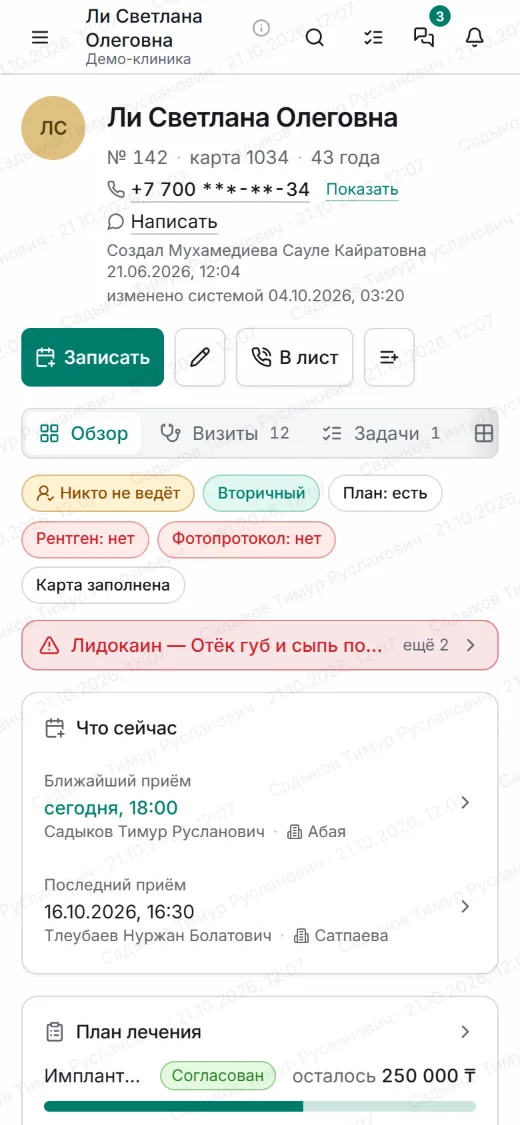
Patient record 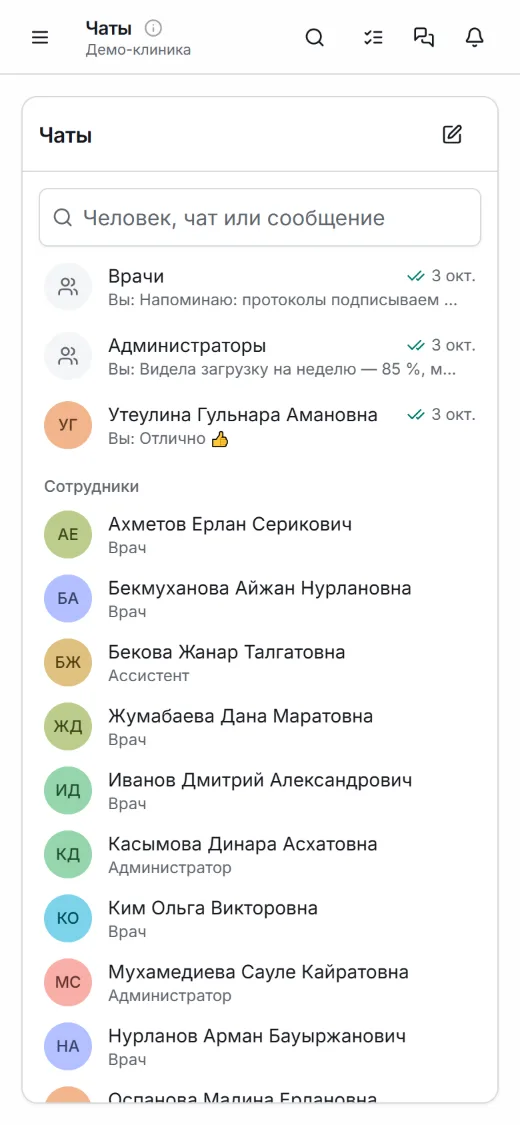
Chats
What’s inside
What works now, what works after connecting, and what is still planned.
- Available works now
- Needs setup works once connected: your 1C, patient messaging, an AI service, migration from a supported system
- Planned not available yet
Schedule and booking
10
- Schedule by room or by doctor: day, week, list
- Book, reschedule and cancel in a few taps
- Confirming appointments the day before
- Waiting list: freed‑up time is not lost
- Calls that have not become bookings yet
- Patient reminders: who to message today and what to say
- Messages before and after a visit, in the clinic’s own words
- Working hours of branches, rooms and staff
- Branches and rooms, each with its own time zone
- Online booking through the clinic’s link
Patient and treatment
11
- Fast patient search and protection from duplicate records
- Patient record: visits, plan, money, documents
- For dentistry: tooth chart and the history of every tooth
- Visit window: notes, diagnosis, services and materials
- Treatment plan: options, stages, printing
- Prescriptions with an allergy check
- What matters about the patient at hand: from a favourite drink to fears
- Every patient has someone responsible and a next step
- Visit checklists to the clinic’s standard
- Contracts and consents in Russian and Kazakh
- Referrals to and from partners
Stock and lab
5
- Stock by branch, receipts and write‑offs
- Stocktaking
- Supplier orders
- Lab work orders
- Sterilization log and equipment
Integrations
8
- Data migration from a supported system Needs setup
- 1C:Accounting: reports and draft documents Needs setup
- SMS and WhatsApp to patients — the clinic’s or branch’s own connection Needs setup
- Search by meaning and AI assistant — through your own AI service Needs setup
- Dictation by voice instead of typing Needs setup
- Telephony: patient card opens on an incoming call Planned
- OSMS and GOBMP: sending services to the Ministry of Health portal Planned
- Signing documents with a digital signature (EDS) Planned
Cash desk and reports
13
- Invoice and payment by any method the clinic accepts
- Refunds and reversal of a mistaken payment
- Big money actions need the owner’s approval
- Radar: the unusual in staff activity, in the owner’s view
- Debts and instalments
- Cash‑desk shift and cash reconciliation
- Reconciliation: performed, invoiced, paid
- Matching non‑cash payments with the bank statement
- Profit, expenses, doctor and patient‑source performance
- Branch sheet: plan, actual and ranking
- Patients get a message about payments and refunds Needs setup
- Accepting payments through Kaspi Pay Planned
- Fiscal receipts through Webkassa Planned
Payroll and time
7
- Timesheet: check‑in and check‑out, including from a phone
- Payroll statement for doctors and staff
- Taxes by the legal entity’s country: Kazakhstan built in
- Bonuses and deductions with a reason
- Advances and payment in parts
- Month close
- Employee payslip, if the clinic enables it
Team and control
10
- Roles and access for every person
- Inviting an employee by email
- Sign‑in methods the clinic chooses: password, code, QR from a phone, passkey
- Shared front‑desk computer: the employee confirms money actions personally
- Activity history
- “Restore the previous version”: you can undo your own edit
- Tasks and assignments
- Staff chats
- Clinic knowledge base: your own rules and instructions
- AI assistant for the help articles and clinic rules Needs setup
Across all sections
7
- A number on the overview opens into the list it came from
- Every list is a table with search, filters and statistics
- Export to a file, by separate permission
- Moving lists in from Excel and Google Sheets
- One search across the whole system
- Computer, tablet and phone
- The system in Kazakh and English Planned
FAQ
Will staff learn it?
Everyone sees what they need for their job: reception — the schedule and cash desk, doctors — their patients and visits. Every section has built‑in help.
Do I need to install anything?
No, it opens in a browser on a computer, tablet or phone. You can add an icon to the phone’s home screen.
Where is the data stored?
Data is hosted in locations that meet the legal requirements of the countries involved. There is no copy of the patient files on an employee’s phone, and exporting lists to a file is a separate permission.
What if the internet goes down?
The system works over the internet. Without a connection the app opens and tells you there is no internet. Everything you managed to save is kept on the server.
Which systems can you migrate from?
We will tell you before the move: we check whether we support your system and show what can be transferred. Patient files, price list, staff and stock can be pasted in from Excel or Google Sheets.
Does it work with 1C?
With 1C:Accounting — once connected. Documents are prepared here and arrive there unposted.
Is it suitable for a chain of branches?
Yes. Each branch has its own rooms, cash desk and stock, and the overview compares branches against plan in one table.
Can we message patients?
Yes, through your own SMS or WhatsApp connection — one for the whole clinic or a separate one per branch. Without a connection the texts are ready and staff send them.
Can patients book on their own?
Yes, through the clinic’s link: the patient picks a service, a doctor and a free time. The booking goes straight into the schedule, and reception confirms it.
What language is the system in?
The system is in Russian; Kazakh and English are being prepared. Patient contracts and consents are available in Russian and Kazakh.
How much does it cost?
We discuss terms when setting you up.
We’ll show it on your clinic’s own tasks
Write to us and we will arrange a demo. No application form, no long calls.
Already using MedERP? Access is granted by the clinic owner.